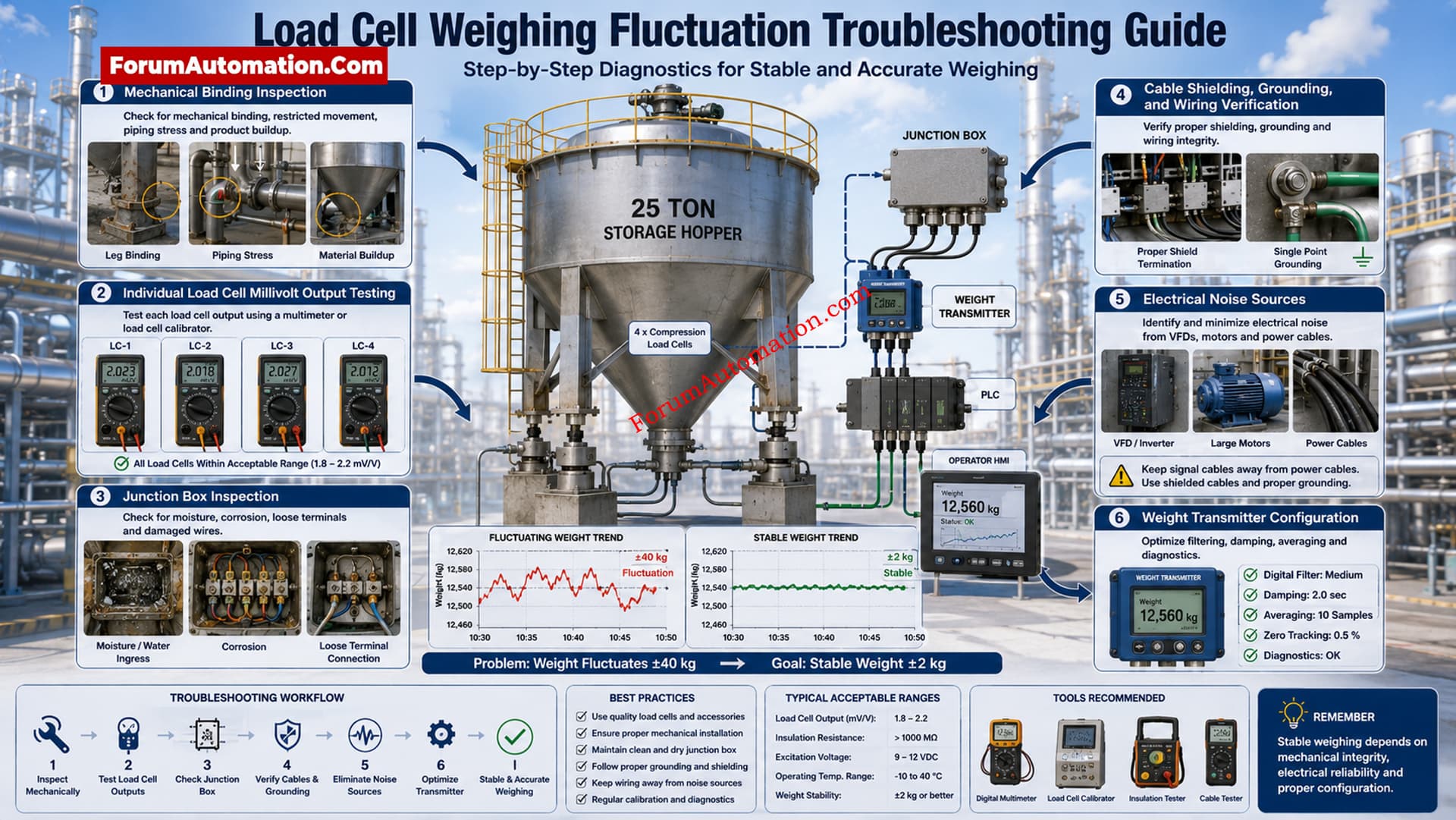
Load Cell Weighing Value Fluctuating
If the hopper is not moving and the load cell is reading a varying weight signal, then the problem is not process variation. Calibration is OK. No PLC or transmitter alarms. Begin troubleshooting by classifying the reason as mechanical, electrical or instrumentation. Systematic examination reduces down time and avoids unnecessary component replacement.
Inspect Mechanical Installation
Check the hopper for binding, pipe stress, product build-up or contact with neighboring structures. Inspect anti-lift devices, expansion joints, load cell orientation, mounting hardware. Even with good calibration, mechanical interference can cause erratic weight indications.
Examine Load Cells and Junction Box
Measure each load cell output individually, under static conditions. Check millivolt signals for drift or imbalance. Check the junction box for dampness, loose terminals, corrosion, damaged trim resistors and water entry. Check Cable Gland and Shield Continuity.
Check Wiring and Electrical Noise
Check excitation voltage, signal wiring, insulation resistance and cable routing. Separate load cell cables from variable frequency drives, motor feeders and high current circuits. Look for adequate single point grounding and ground loops that pick up electrical interference in low level millivolt signals.
Evaluate Transmitter and Indicator
Review filtering/damping/averaging/update rates. Watch the raw input data to see if fluctuations are happening before or after signal conditioning. Check
power supply voltage and regulation.
Most of the time, a methodical check of mechanical conditions, individual load cell outputs, junction box health, wire quality, grounding, electrical noise and transmitter settings will find the root reason. Getting the weighing back to being steady improves the accuracy of batching, decreases disruptions to production and makes weighing systems more reliable.